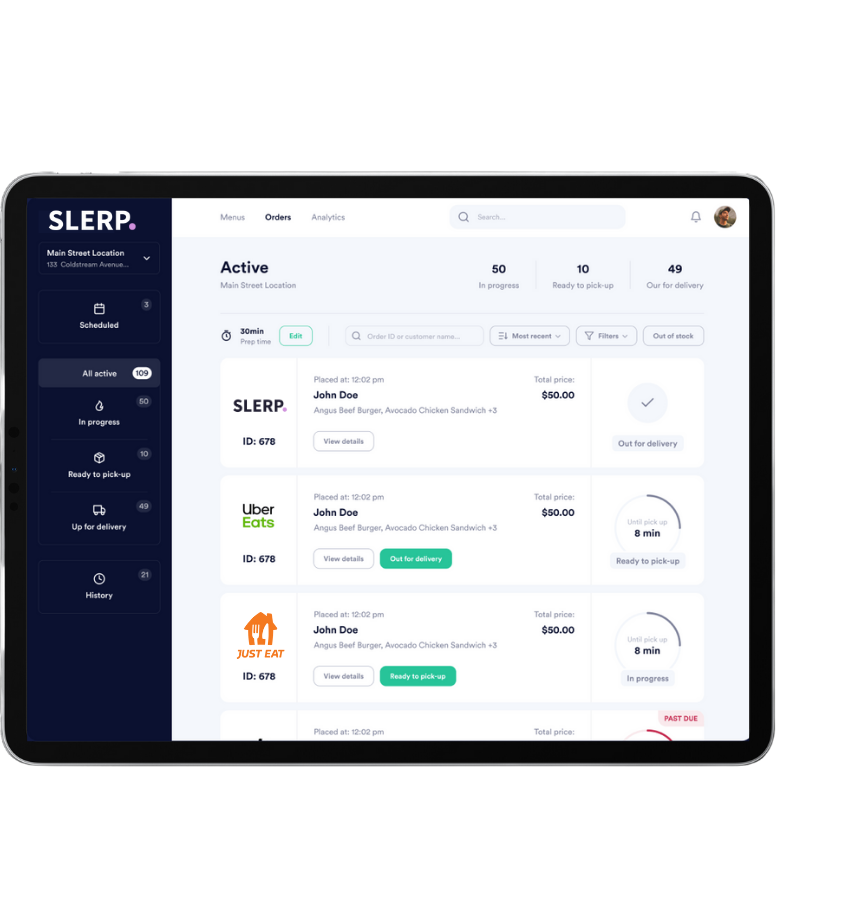
Slerp’s Order Manager centralises every order from marketplaces and direct channels onto a single device. No more tablet clutter, manual rekeying, or missed tickets.
Live orders — today
Sent to kitchen
On the line
Scheduled
One queue for every channel
Uber Eats, Deliveroo, Just Eat and Slerp drop into one Order Manager, then sync straight into your POS.
Slerp Order Manager
In progress · Driver on the way
Accepted · Prep time 12 mins
Scheduled · Auto-printed to kitchen
Your POS
Every accepted order is pushed into your POS for stock, sales and kitchen production — no manual rekeying or duplicate tickets.
Why restaurants use Slerp Order Manager
From independents to multi-site groups, Slerp gives operators a single source of truth for all online orders, while POS and kitchen teams work from one streamlined workflow.
Pull every incoming order from marketplaces and direct channels into one device. No more juggling multiple tablets or missing tickets during peak.
Send orders straight to the kitchen via printer or display screen. Eliminate manual entry, cut errors, and get food on the pass faster.
Connect to your existing POS or run Slerp as a standalone solution. Ideal if you’re upgrading systems or running mixed setups across locations.
Manage menus, pricing and availability centrally. Tailor by platform, by location, and keep everything in sync with a few clicks.
Deep integrations where it matters
Slerp connects your POS, marketplaces and direct channels so your team can manage everything from one Order Manager. Orders flow in, menus stay in sync, and the kitchen always knows what’s next.
Use Slerp to choose which delivery partners fulfil each order, reconcile courier invoices, and keep operations efficient across all sites.
Marketplace & direct, side by side
Same-day marketplace orders, catering bookings and direct click & collect all flow through one Order Manager. One queue, one team view.
Update menus across every marketplace and direct channel in just a few clicks.
Replace a row of tablets with one Order Manager app your team can live in.
Every accepted order posts into your POS and kitchen workflow automatically.
Adjust menus, pricing and availability by site and by platform in one place.
Compare your options
Multiple tablets, manual entry and disconnected POS systems slow down service and create errors. Slerp Order Manager centralises everything, keeps data clean and gives your team one workflow.
| Slerp Order Manager | Multiple tablets | POS only | |
|---|---|---|---|
| Centralised orders from all online channels | ✓ | ✕ | ✕ |
| Automated transfer to kitchen (printer / KDS) | ✓ | ✕ | ✓ |
| Works with or without a POS system | ✓ | ✓ | ✕ |
| Real-time order & delivery status updates | ✓ | ✕ | ✕ |
| Centralised menu management across platforms | ✓ | ✕ | ✕ |
| Single device instead of multiple tablets | ✓ | ✕ | ✓ |
| Control over which partners fulfil each order | ✓ | ✕ | ✕ |
| Manual rekeying and higher risk of errors | ✕ | ✓ | ✓ |
| Multiple screens cluttering the counter | ✕ | ✓ | ✕ |
Next step
Book a quick walkthrough of Order Manager and see how it works with your POS, marketplaces and direct channels.
Choose a time that suits you, share your current setup, and we’ll show you how Order Manager can simplify operations across all your sites.
Book a meeting →