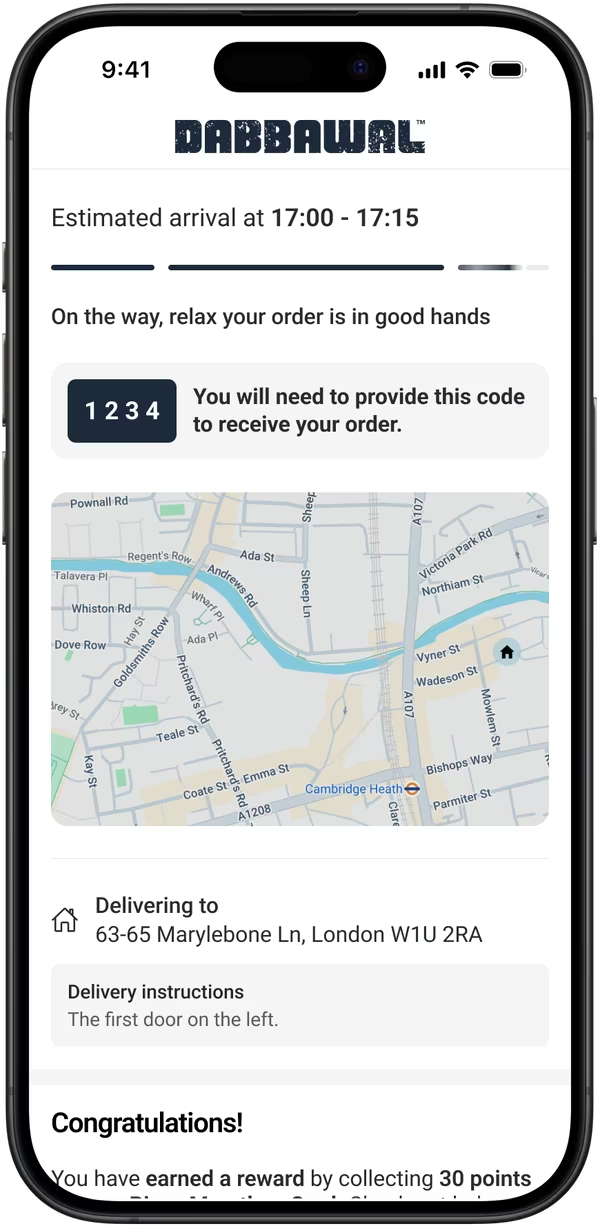
















 Delivery orderCourier booked by Slerp✓Leat pointsEarned on the order✓
Delivery orders that earn
Orders delivered by Deliveroo, Uber and Just Eat couriers through Slerp earn Leat points.
Take orders direct.
Every order type.
Keep them coming back.
 1,000 direct orders in the first month

 10 days to go live, 9 pizzerias

 +31% online orders

 16,000 contacts it owns

Who we work with
See all case studiesUnderstand more.
Updates & help.
Slerp ordering and Leat loyalty working as one
Earn and spend Leat rewards on every web, app and delivery order.
Customers order direct and their Leat rewards and vouchers are usable on every order.
Leat runs your loyalty programme and holds every balance. Slerp enables the orders and brings the rewards to checkout.
 Your loyalty programme
Your programme runs in Leat. Your customers only ever see your brand.
Sign up.
Sam creates an account on your website or app.
Sam joins your Leat programme the moment the account exists.
Basket.
Sam’s points balance shows at checkout, with vouchers that fit the order.
Reward.
Sam spends points on a reward in one tap.
Leat gift cards can pay at checkout too.
Earn.
The order lands in Leat, and Sam earns points on your rules.
A refund takes the points back off, automatically.
One balance, held in LeatYour loyalty runs on Leat. Your ordering, delivery and app run on Slerp.
Delivery orderCourier booked by Slerp✓Leat pointsEarned on the order✓Orders delivered by Deliveroo, Uber and Just Eat couriers through Slerp earn Leat points.
The same Leat vouchers, rewards and gift cards work in your own iOS and Android app.
Switch order sync on or off for each site, so a till already feeding Leat is never counted twice.
Install Slerp from the Leat marketplace, paste your token into Controls and link your stores.
Quick answers to the most common setup and operational questions.
Yes, directly. Slerp has a two-way integration with Leat, the loyalty platform formerly called Piggy. Slerp sends your customers, menu and orders to Leat, and your customers spend their Leat points, vouchers and gift cards on your website and app.
New customers as soon as they sign up, your menu, and every order with its payment status and any refund. Points earn on the scheme rules you set in Leat, and a refund takes them back off.
Yes. Customers see their points balance at checkout, apply vouchers that fit the basket and spend points on rewards in one tap. Leat gift cards work at checkout too. During setup, you link each Leat reward and voucher to a reward in Slerp.
Yes. Delivery orders placed on your website or app are your direct orders, so they earn points like any other. Slerp books the courier with Deliveroo, Uber or Just Eat, and our team supports the customer on every delivery.
Yes. Leat vouchers, rewards and gift cards work in your own iOS and Android app as well as on your website, so customers never need a separate loyalty app.
No. You choose, site by site, whether Slerp sends orders to Leat. Where your till already passes Slerp orders on to Leat, switch Slerp’s order sync off for that site.
Install Slerp from the Leat marketplace, paste your access token into Slerp Controls and link your stores to your Leat locations. Then link each Leat reward and voucher to a Slerp reward. It takes about 10 minutes.
Yes. Orders through Slerp are your direct orders, so every name, email and order sits in your Slerp account and in your Leat programme.
Let’s talk through your setup, and we’ll show you how your Leat programme works across direct ordering, delivery and your app.
No commitment · Free setup walkthrough